Which is Better Value? Asus Chromebook Cx15 vs Acer Aspire Go 15 Compared
Choosing a 15-inch laptop often comes down to a few practical tradeoffs: operating system, battery life, everyday performance, and how the machine will be used day-to-day. This article compares the Asus Chromebook Cx15 and the Acer Aspire Go 15 from the perspective of value — what buyers actually get for their money across common real-world use cases such as study, remote work, media consumption, light content creation, and travel.
Quick summary
At a glance, the two machines target different user priorities. The Asus Chromebook Cx15 is built around ChromeOS simplicity, long battery life, and security for education and casual productivity. The Acer Aspire Go 15 is a Windows-based 15-inch laptop aimed at users who need wider application compatibility and a more traditional PC experience. Value depends on the buyer: those who prioritize low maintenance, fast web-based workflows, and affordability will likely find better value in the Chromebook, while users who need Windows apps, broader peripheral compatibility, or greater hardware flexibility will lean toward the Aspire Go.
In-depth product reviews
Asus Chromebook Cx15 — what it offers
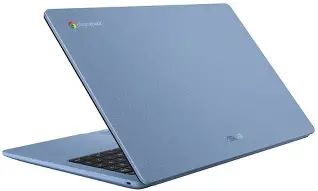
The Asus Chromebook Cx15 is a 15.6-inch Chromebook positioned for students, educators, and buyers who want a large-screen device without the complexity of Windows. Typical configurations pair energy-efficient Intel processors with 4–8GB of RAM and 64–128GB of onboard eMMC or SSD storage. The large display and ChromeOS optimizations make it useful for web browsing, document editing, video streaming, and running Android apps.
Display and multimedia
The Cx15's 15.6-inch panel emphasizes readability and a comfortable workspace for spreadsheets, research, and split-screen browser windows. While color accuracy and peak brightness generally trail higher-end IPS panels, the screen is well-suited for streaming video and classroom presentations. Webcam quality and speakers are tuned for video calls and remote learning rather than professional content creation.
Performance and day-to-day use
ChromeOS keeps the software layer lightweight. In everyday scenarios — web browsing with multiple tabs, cloud-based productivity suites, and media playback — the Cx15 feels responsive, particularly with SSD storage and 8GB of RAM. It is not designed for heavy video editing, large-scale local compilation, or demanding Windows-only software. Linux app support (via Crostini) expands what the Chromebook can do, but heavy development workflows will still be limited by CPU and memory.
Battery life and portability
One of the Chromebook's strengths is battery efficiency. Typical battery life commonly exceeds a full work/school day under mixed usage thanks to ChromeOS optimizations and low-power CPUs. The chassis balances a larger screen with a light-ish footprint for a 15-inch machine, making it acceptable for daily transport in a backpack.
Security and maintenance
ChromeOS is attractive to buyers who value simplicity: automatic updates, sandboxed tabs, and a lower maintenance overhead. For families, schools, or users who dislike troubleshooting, the Chromebook model reduces long-term support costs and security concerns.
Acer Aspire Go 15 — what it offers
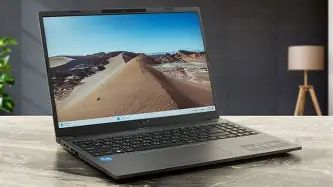
The Acer Aspire Go 15 is a 15.6-inch Windows laptop built to satisfy a broader range of tasks. It typically ships with a choice of Intel or AMD processors, 8–16GB of RAM options, and larger SSD capacities. As a Windows machine, it supports legacy desktop applications, is more flexible with peripherals, and gives buyers the ability to run resource-hungry software.
Display and multimedia
The Aspire Go 15 often offers brighter or higher-resolution screen options compared with budget Chromebooks, which benefits photo editing, video playback, and productivity. Speakers and webcam quality can vary by trim, but Windows' wider range of media apps and drivers can make the overall multimedia experience richer.
Performance and expandability
With stronger CPU options and the ability to configure higher RAM and SSD capacities, the Aspire Go 15 handles multitasking, local editing, and even light-to-moderate creative workloads better than typical Chromebooks. The Windows environment also means access to native desktop tools for productivity, developer environments, and specialized software.
Shop the latest Laptops & Computers picks on Amazon.
See Deals →Battery life and portability
Battery life on Windows devices is improving but still depends heavily on configuration, display choice, and the installed CPU. The Aspire Go 15's power draw can be higher under load, so buyers who need guaranteed all-day battery life should pick configurations with efficient processors and lower-resolution displays or consider larger-battery SKUs.
Software and ecosystem
Windows offers a familiar computing environment for enterprise users, power users, and gamers. The trade-off is a larger maintenance surface: manual updates, antivirus considerations, and more driver variability. For organizations that require specific Windows applications, the Aspire Go 15 is the practical choice.
Pros & cons
Asus Chromebook Cx15
- Pros:
- Fast boot-up and low maintenance with ChromeOS
- Long battery life for web-based workflows
- Large 15.6-inch screen for productivity and media
- Good value in lower price tiers for students and schools
- Built-in security and automatic updates
- Cons:
- Limited for Windows-only desktop applications
- Not ideal for heavy local content creation or development without compromises
- Smaller local storage on budget models
- Display quality may be basic on entry-level trims
Acer Aspire Go 15
- Pros:
- Runs Windows with full desktop application support
- Configurable with higher RAM and SSD for better multitasking
- More options for ports and peripheral compatibility
- Better suited to light content creation and local workloads
- Cons:
- Potentially shorter battery life under heavy use
- More maintenance required (updates, drivers, security software)
- Higher cost for higher-spec configurations
Direct comparison
| Category | Asus Chromebook Cx15 | Acer Aspire Go 15 |
|---|---|---|
| Operating System | ChromeOS — lightweight, web-centric | Windows — full desktop ecosystem |
| Typical CPU options | Energy-efficient Intel processors (Celeron/Pentium/low-power Core variants) | Intel or AMD mainstream processors (U-series and comparable chips) |
| RAM | 4–8GB common (some SKUs 8GB) | 8–16GB typical (upgradeable depending on model) |
| Storage | eMMC or small SSD (64–128GB common) | NVMe SSDs (256GB and up common) |
| Display | 15.6" panels suited for productivity; basic color accuracy on entry models | 15.6" panels with brighter/higher-resolution options on higher trims |
| Battery life | Excellent for web-centric use; often a full day | Good to moderate; highly dependent on configuration |
| Weight & portability | Relatively lightweight for 15-inch Chromebooks | Varies; similar footprint but can be heavier based on battery and chassis |
| Ports | Reasonable selection — USB-A, USB-C, microSD on many models | Typically more options and full-size HDMI on many trims |
| Best for | Students, educators, casual users, families | Office users, power users who need Windows apps, light creators |
| Value proposition | Low cost of ownership and simplicity | Flexibility and performance for more demanding workflows |
Real-world use cases — which laptop fits which buyer?
Students and educators
The Asus Chromebook Cx15 shines for K–12 and many college students who rely on web-based learning platforms, Google Workspace, and browser-based collaboration tools. Its fast boot, long battery, and low admin overhead make it ideal for shared or managed environments. The Acer Aspire Go 15 is better for students who need Windows-specific software (for example, certain engineering or design packages) or who prefer a Windows desktop for compatibility.
Remote and hybrid workers
Remote workers who use cloud-first productivity tools and video conferencing will be well-served by the Chromebook's reliable performance and video call optimizations. Workers who need to run legacy business apps, virtual machines, or heavier productivity suites will find the Aspire Go's Windows environment and more powerful hardware a better match.
Content consumption and light creation
For streaming, browsing, and light photo edits, both devices are capable. The Aspire Go 15, when configured with a higher-quality panel and more RAM, enables smoother local photo edits and basic video trimming. The Chromebook is sufficient for cloud-based photo editing and rapid content consumption without the extra cost.
Travel and field use
Battery life and reduced maintenance on the Chromebook make it attractive for travel. The Aspire Go 15 can travel comfortably but may require closer attention to battery planning and power settings during long workdays away from outlets.
Practical buying guide — how to choose based on priorities
When choosing between the Asus Chromebook Cx15 and the Acer Aspire Go 15, ask the following questions and use the guidance below to prioritize features that matter most.
1. Does the buyer need Windows-only applications?
If yes: Choose the Acer Aspire Go 15. It runs native Windows apps and supports a broad range of peripherals and enterprise tools. If no: a Chromebook can deliver simpler, faster operation at a lower cost.
2. How important is battery life and low maintenance?
Chromebooks typically win here. ChromeOS handles updates and security automatically, reducing time spent on maintenance and troubleshooting. For users who prioritize “set it and forget it” reliability, the Cx15 is preferable.
Shop the latest Laptops & Computers picks on Amazon.
See Deals →3. Is local storage or upgradeability a priority?
Windows laptops like the Aspire Go 15 typically offer larger SSDs and potential upgradability. Buyers who store large photo/video libraries or want a responsive local editing environment should prioritize the Aspire Go with a larger SSD and 16GB RAM if budget permits.
4. Are display quality and color accuracy important?
Look for higher-resolution or IPS panels on the Aspire Go 15 if color accuracy matters. If the bulk of work is web browsing, document editing, and occasional streaming, the Chromebook's standard panels will suffice.
5. What about keyboards, trackpads, and webcams?
Try both in person if possible. Typing comfort and webcam clarity matter for long writing sessions and frequent video calls. Chromebooks often tune their webcams and microphones for conferencing; Windows laptops can vary more by configuration.
6. Total cost of ownership
Consider not only the purchase price but also software and support over time. Chromebooks avoid licensing costs for many productivity needs (web apps and Android apps). Windows machines might require paid software and antivirus over the device lifetime, which can increase ownership costs.
7. Future-proofing
If a buyer expects to pivot to heavier local workloads (e.g., freelancing as a photo editor, running VMs for development), choose hardware that has headroom: more RAM, faster CPU, and larger SSD. For those whose workflows are likely to stay cloud-based, prioritize battery life and portability.
Configuration checklist before purchase
- For the Chromebook Cx15: Aim for 8GB RAM and an SSD rather than eMMC if using Linux apps or many tabs. Confirm Wi-Fi 6 support if long term use matters. Verify keyboard layout and webcam quality in-store.
- For the Aspire Go 15: Choose at least 8GB RAM (16GB recommended for heavier multitasking), NVMe SSD of 256GB or higher, and a mid-range CPU if planning to do local editing. Confirm port selection for external monitors or docking.
- Always check the warranty and support terms, and whether the vendor offers on-site or extended service if uptime matters for work.
Final verdict — which is better value?
Value is contextual. For most buyers who want a large-screen laptop for web-first use, predictable performance, and minimal fuss, the Asus Chromebook Cx15 represents better overall value: lower upfront cost in many configurations, outstanding battery life, security, and easier management. It particularly suits students, teachers, families, and travelers who prioritize reliability and time saved on maintenance.
For buyers who need a full Windows environment, run specific desktop applications, or want higher local performance and upgradability, the Acer Aspire Go 15 offers better value despite a higher potential cost. It provides greater flexibility, higher-spec hardware options, and broader app compatibility — valuable for power users, office professionals, and light content creators.
Ultimately, the better value depends on intended workflows: choose the Chromebook for simplicity and longevity in cloud-centric workflows; choose the Aspire Go for power, flexibility, and the ability to run any Windows software. Both models deliver a compelling set of features for their target audiences, so buyers should match the machine to their day-to-day needs rather than chasing headline specs alone.