Don't Buy Until You Read This: Arduino vs Raspberry Pi Whats The Difference
Anyone shopping for beginner-friendly electronics hardware will quickly run into two names: Arduino and Raspberry Pi. They are often mentioned together, compared in the same buying guides, and treated as interchangeable by first-time buyers. That is usually where confusion begins. While both platforms are excellent, they are built for different jobs, different skill levels, and different expectations.
For many buyers, the real question is not which one is better, but which one makes sense for the project they actually want to build. One person may want to automate a greenhouse sensor, another may want a retro gaming console, and someone else may be trying to learn coding, robotics, or home automation. In each of those cases, the right choice can change dramatically.
This comparison takes a practical look at what separates Arduino from Raspberry Pi, where each platform shines, what common frustrations buyers should know in advance, and how to choose without wasting money on the wrong board. Instead of focusing only on technical jargon, it centers on the things buyers usually care about most: ease of use, power requirements, reliability, flexibility, price, accessories, and real-world applications.
What Arduino and Raspberry Pi Actually Are
At first glance, Arduino boards and Raspberry Pi boards can both look like small computer components with ports, pins, and endless project potential. Under the surface, though, they are fundamentally different.
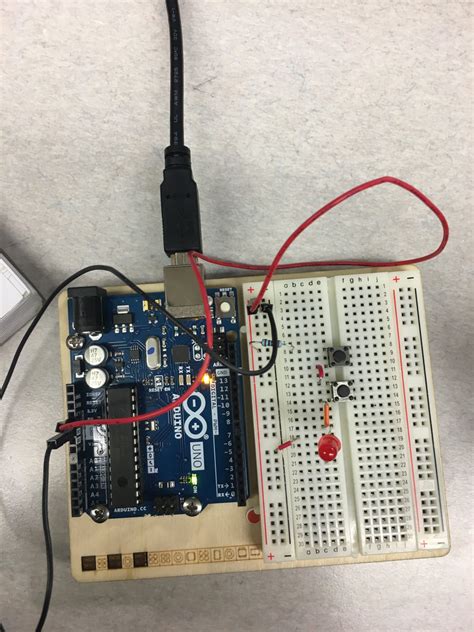
Arduino is primarily a microcontroller platform. That means it is designed to run one task, or a small set of tasks, repeatedly and reliably. It is excellent at reading sensors, controlling motors, blinking lights, reacting to buttons, and handling hardware interactions with minimal overhead. Most Arduino boards do not run a full operating system. Instead, they run a single uploaded program directly.
Raspberry Pi, by contrast, is a single-board computer. It behaves much more like a tiny desktop PC. It can run an operating system, store files, connect to the internet, run multiple applications at once, and support peripherals such as monitors, keyboards, mice, cameras, and external drives. In practical terms, a Raspberry Pi is better thought of as a compact Linux computer than as a simple controller board.
This difference shapes everything else: startup time, project complexity, software tools, power use, hardware control, and overall user experience.
Core Difference: Controller vs Computer
The simplest way to explain the difference is this: Arduino is best for direct control of electronics, while Raspberry Pi is best for computing-heavy or software-rich projects.
An Arduino can start almost instantly when powered on. It does not need to boot into an operating system. That makes it ideal for devices that should just work every time, such as automatic watering systems, alarm triggers, LED controllers, or basic robotics. If a project needs to respond consistently to physical inputs and outputs, Arduino usually feels more natural.
A Raspberry Pi needs to boot like a computer. It uses storage media, usually a microSD card or equivalent solution, and typically runs a Linux-based operating system. That gives it much greater flexibility. It can host a web server, run Python scripts, display a graphical interface, process images, stream media, connect to cloud services, and support multitasking. But this flexibility comes with added complexity, longer setup time, and greater sensitivity to power and storage issues.
Buyers deciding between the two should first ask whether the project is primarily about controlling hardware or running software. That one distinction solves much of the confusion.
Performance and Capability
In raw computing terms, Raspberry Pi is in a different class entirely. It has a processor, RAM, storage support, networking, and operating system support that allow it to do much more than a typical Arduino board. Tasks like video playback, graphical dashboards, machine learning experiments, browser-based interfaces, or camera processing are all far more practical on a Raspberry Pi.
Arduino is not trying to compete in those areas. Its strength is simplicity and real-time responsiveness. When a sensor crosses a threshold and a relay must switch immediately, or a motor controller must react in a predictable way, Arduino often provides cleaner, more dependable behavior. That is why it remains popular in embedded systems, classroom labs, robotics, and low-power control circuits.
Looking for the best Electronics deals on Amazon?
See Deals →For example, a buyer building a weather station with a simple display and long battery life may prefer Arduino. A buyer building a smart dashboard that logs weather data to a website, displays graphs, and syncs remotely may prefer Raspberry Pi.
Ease of Setup for Beginners
Both platforms are beginner-accessible, but they challenge users in different ways.
Arduino setup is often easier for those who want to learn basic electronics. A user installs the Arduino IDE, connects the board, writes or loads a sketch, and uploads it. The workflow is straightforward. The board then runs the program directly. For simple hardware projects, this can feel refreshingly direct.
That said, beginners with no electronics background may still need to learn about breadboards, resistors, voltage limits, and wiring. Arduino is forgiving in terms of software complexity, but physical circuit knowledge matters more.
Raspberry Pi setup can be easier for those already comfortable with computers. Installing an operating system, configuring Wi-Fi, updating packages, and using Linux tools may feel familiar to some users and intimidating to others. It often requires more steps before the first project can even begin.
For total beginners, Arduino usually offers a more focused path into electronics, while Raspberry Pi offers a broader path into computing, programming, and maker projects with software depth.
Real-World Use Cases
When Arduino Makes More Sense
Arduino is usually the better fit when the project is dedicated to one hardware-driven purpose. Common examples include:
- Home automation triggers: motion sensors, door alarms, irrigation timers, and thermostat-style controls
- Robotics: line-following robots, obstacle avoidance, servo control, and motor-driving logic
- Wearables and compact devices: LED clothing, simple health-monitoring prototypes, and battery-powered gadgets
- Industrial-style monitoring: reading temperature, humidity, pressure, or analog signals with reliable looping behavior
- Classroom electronics: beginner projects where students need to understand sensors, outputs, and embedded logic
In these cases, buyers usually appreciate Arduino's lower overhead, fast startup, and relatively low power demand.
When Raspberry Pi Makes More Sense
Raspberry Pi is better when a project needs a full software environment or richer connectivity. Typical examples include:

- Media centers: streaming local media, digital signage, and retro gaming systems
- Home servers: file sharing, ad blocking, smart home dashboards, and self-hosted tools
- Camera and computer vision projects: surveillance, time-lapse capture, and image recognition experiments
- Programming education: learning Linux, Python, web development, and networking on affordable hardware
- Internet-connected data systems: devices that log, process, visualize, and upload data
Buyers often choose Raspberry Pi when they want one small board to do many different jobs and support future experimentation.
Pros and Cons of Arduino
Advantages of Arduino
- Simple and reliable for hardware control: It excels at repetitive, dedicated tasks without needing an operating system.
- Fast startup: Powering on typically means the project starts immediately.
- Low power consumption: Many Arduino-based builds are more practical for battery use.
- Strong beginner ecosystem: Tutorials, shields, starter kits, and community examples are widely available.
- Excellent for real-time input/output: Sensors, actuators, relays, and motors are a natural fit.
Disadvantages of Arduino
- Limited computing power: It is not built for heavy processing, complex interfaces, or multitasking.
- Minimal user interface options: Rich displays, desktop-like controls, and multimedia features are limited.
- Less suitable for advanced networking by default: Internet features are possible but often require extra modules or more setup.
- Memory constraints: Larger applications can quickly hit hardware limits on some models.
Pros and Cons of Raspberry Pi
Advantages of Raspberry Pi
- Full computer functionality: It can run Linux, multitask, and support a wide range of software.
- Much higher performance: It handles networking, file systems, media, scripting, and complex logic far better than a microcontroller.
- Excellent connectivity: USB, networking, display support, storage, and peripherals make it extremely flexible.
- Strong support for modern programming: Python, web stacks, databases, and automation tools are easily accessible.
- Ideal for multipurpose projects: One board can act as server, controller, interface, and logging system.
Disadvantages of Raspberry Pi
- More complex setup: It often requires operating system installation, updates, and configuration.
- Slower startup: It boots like a computer, which is not ideal for every embedded use case.
- Higher power requirements: Power stability matters more, especially with attached accessories.
- Storage wear and corruption risks: Improper shutdowns can damage or corrupt system storage.
- Not as inherently simple for low-level control: Direct hardware timing and deterministic behavior can be less straightforward than on Arduino.
Arduino vs Raspberry Pi Comparison Table
| Feature | Arduino | Raspberry Pi |
|---|---|---|
| Type of device | Microcontroller platform | Single-board computer |
| Operating system | No full OS required | Usually runs Linux or another OS |
| Startup speed | Almost instant | Requires boot time |
| Best for | Sensors, motors, automation, embedded control | Servers, media, dashboards, coding, networked apps |
| Power consumption | Generally lower | Generally higher |
| Ease of hardware interfacing | Excellent | Good, but often more layered |
| Software flexibility | Limited | High |
| Multitasking | No | Yes |
| Battery-powered builds | Often better suited | Less efficient for many simple portable builds |
| Learning focus | Embedded electronics and control logic | Computing, Linux, networking, and software projects |
What Buyers Typically Care About Most
Price Beyond the Board
One of the most common buying mistakes is comparing only the cost of the board itself. In reality, the total setup cost matters more.
An Arduino project may require sensors, jumper wires, resistors, breadboards, shields, and sometimes a case or power module. A Raspberry Pi setup often needs a power supply, storage, possible cooling, cables, and sometimes a monitor, keyboard, or case. Depending on the project, either platform can end up costing more than expected once the needed accessories are added.
Discover deals on Electronics — updated daily.
Shop Amazon →Buyers should budget for the complete working setup, not just the base board.
Reliability for Long-Term Projects
If the goal is a small device that should switch on and keep doing one job for months, Arduino has an advantage. It is purpose-built for dedicated embedded behavior and avoids many of the complications introduced by an operating system.
Raspberry Pi can also run long-term projects very well, but it usually benefits from careful configuration, proper cooling when needed, stable power, and attention to storage health. For a dashboard kiosk or a home server, that is acceptable. For a tiny always-on controller in a utility box, Arduino may feel more dependable.
Learning Curve and Frustration Level
People often buy the more powerful board assuming it is automatically the smarter choice. That is not always true. Raspberry Pi can be overkill for simple electronics tasks, and that extra complexity can slow down beginners. On the other hand, Arduino can feel restrictive to users who expect desktop-style computing or easy multimedia support.
The least frustrating purchase is usually the one matched to the intended project type, not the one with the most impressive specifications.
Buying Guide: Which One Should a Buyer Choose?
Choose Arduino if:
- The project centers on sensors, switches, motors, relays, or LEDs
- The device should turn on and work immediately
- Low power use matters
- The build may run on batteries
- The user wants to learn embedded programming and basic electronics
- The goal is a dedicated device rather than a miniature computer
Choose Raspberry Pi if:
- The project needs a full operating system
- The user wants to run software, scripts, web interfaces, or multiple services
- Internet connectivity, storage, and file handling are central to the project
- The build may involve media playback, cameras, dashboards, or server functions
- The user wants to explore Linux, Python, or general computing on low-cost hardware
- Future project flexibility matters more than minimalism
Choose Both Together if Necessary
There is also a practical middle ground that experienced makers use often: combining both platforms in the same project. An Arduino can handle the hardware-level control, while a Raspberry Pi manages the interface, logging, networking, or remote access. For example, in a smart greenhouse, Arduino might read sensors and control pumps, while Raspberry Pi stores data, hosts a dashboard, and sends alerts.
That hybrid approach is not usually necessary for a beginner's first purchase, but it is worth knowing because it shows that these platforms are not true enemies. They solve different layers of the same problem.
Common Buying Mistakes to Avoid
- Buying Raspberry Pi for a simple sensor project: It may work, but it can add unnecessary complexity and power requirements.
- Buying Arduino for a project that needs a modern interface: If the build requires a web app, video, or heavy data processing, Arduino may feel limiting fast.
- Ignoring accessories: Power supplies, storage, cables, and components often decide the real value of the purchase.
- Overestimating beginner readiness: The best board is the one the buyer can realistically set up and troubleshoot.
- Choosing based on hype instead of use case: Popularity should not outweigh project requirements.
Final Verdict: Whats the Difference, and Which One Is Better?
The difference between Arduino and Raspberry Pi is not small or technical in the narrow sense. It is a difference in purpose. Arduino is a control-focused electronics platform, while Raspberry Pi is a full-featured compact computer. Buyers comparing them side by side should stop asking which is more powerful and start asking which is more appropriate.
For hardware projects that need responsiveness, simplicity, and efficient control, Arduino is often the smarter buy. For software-rich projects that need computing power, networking, storage, and flexibility, Raspberry Pi usually makes more sense. Neither is universally better; each is excellent when used the way it was intended.
For most first-time buyers, the best decision comes from being honest about the actual end goal. If the project is meant to control the physical world, Arduino is often the right starting point. If the project is meant to act like a tiny computer that also interacts with hardware, Raspberry Pi is usually the better investment. Understanding that difference before buying is what prevents the most common disappointment.